Walking the SDLC with OpenSpec: a TODO app, one branch per step
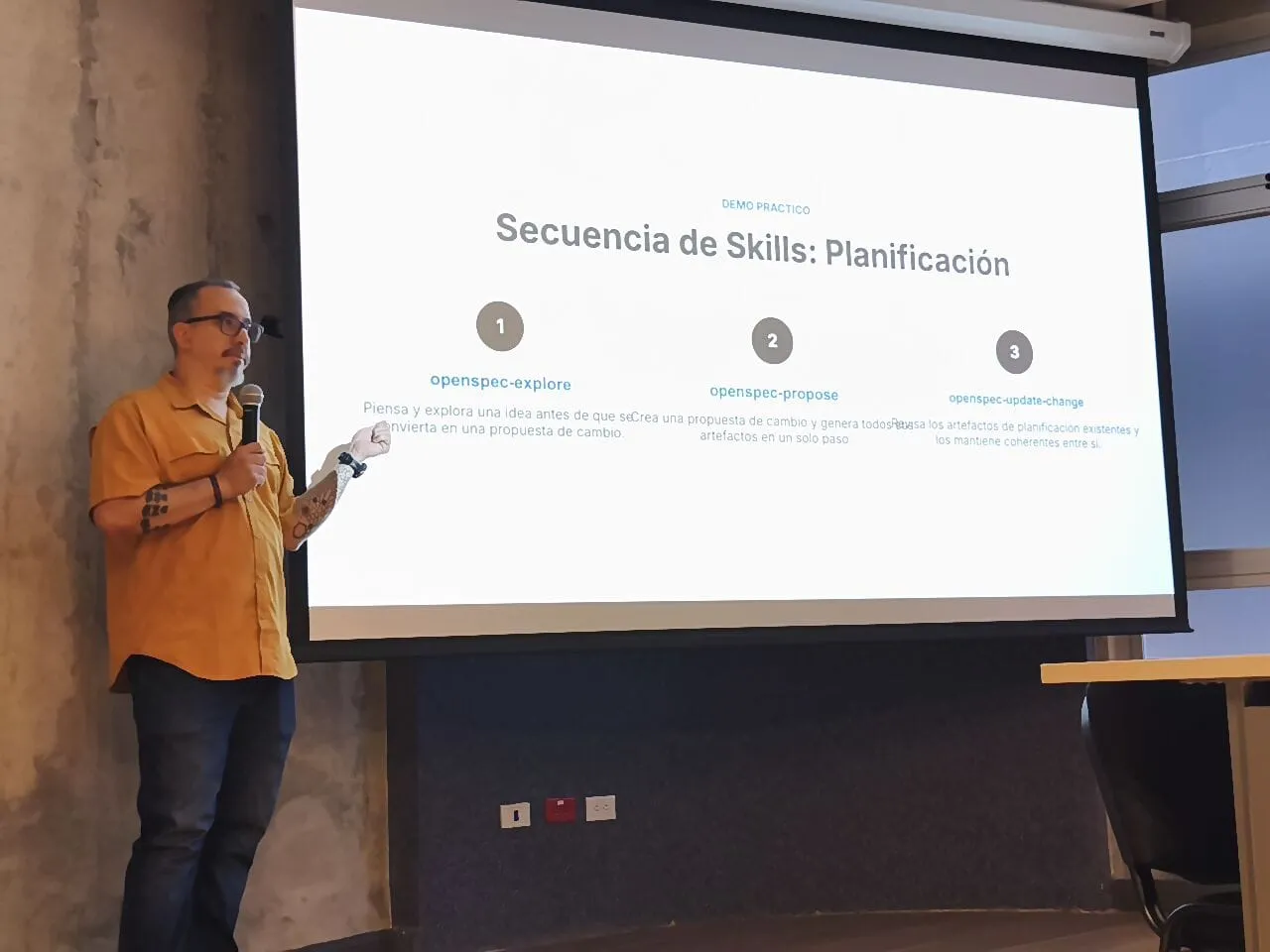
Today I presented at the Escuela de Computación e Informática, invited for their Semana de la Ingeniería. The talk was called “Uso de Modelos Largos de Lenguajes en el Ciclo de Vida de Desarrollo de Software”, and I wanted the demo to show the whole lifecycle, not just the part where code appears.
So I built a small app, a multi-user TODO list with authentication, and I used OpenSpec to drive every step. The whole thing is public at fr4gus/demo-todo-list-openspec. This post is what I did, what I noticed, and a look at what the rest of the industry is doing about the same problem.
The demo: one branch per phase
The repo is organized so that each branch starts from the previous one and adds exactly one step of the process:
main
  -> openspec-init
  -> openspec-explore-propose
  -> openspec-apply-platform-scaffold
  -> openspec-apply-add-user-auth
  -> openspec-apply-add-todo-items
  -> openspec-apply-add-todo-ui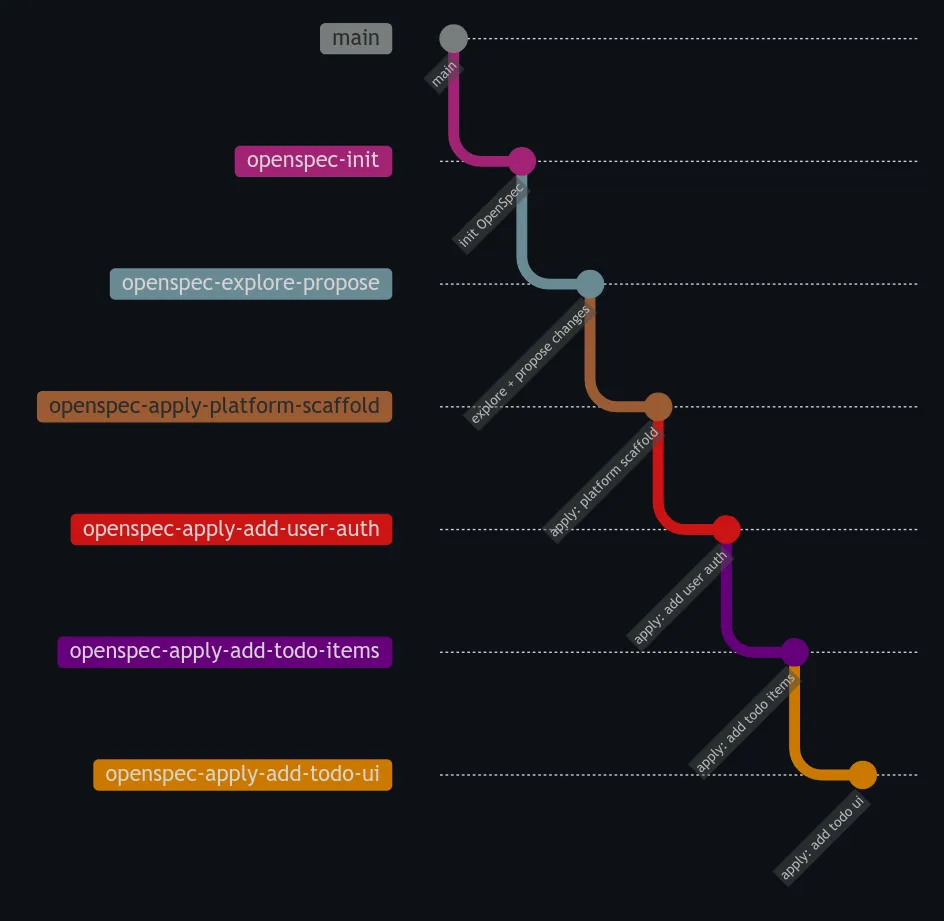
mainholds a rough PRD: the description of the app, the tech stack (React + Vite, Spring Boot 3 on Java 21, PostgreSQL, Redis), the architecture and testing requirements, and the screen flow. It is the kind of document a product owner might hand you: useful, but not precise.openspec-initis just OpenSpec set up in the repo, with its slash commands and skills installed for Claude Code.openspec-explore-proposeis where the interesting thinking happens. I explored the PRD with the model, and from that it proposed the whole plan as a set of changes, each with a proposal, a design, spec deltas and a task list: platform scaffold, user auth, todo items, todo UI, and an admin user overview.- The
applybranches implement one change each. The scaffold (24 tasks) gives backend, frontend, containers and CI. Auth (18 tasks) adds accounts, JWT login and password recovery. Items (8 tasks) is the per-user CRUD API with a Redis cache. The UI (13 tasks) is the priority-colored list with completion and Undo.
At the end of the chain you can run docker compose up and have a working app
with sign-up, sign-in, password reset through a local mail catcher, and a TODO
list. The commits span two days. The admin overview change is proposed but not
applied yet, which turned out to be handy: it is a ready-made “what’s next” for
anyone who wants to continue the exercise.
Using branches instead of a single history was a teaching decision. In a live talk nobody wants to watch a model write a JWT filter. They want to see what the repo looks like after each phase and compare it with the one before.
What I got out of the process itself
A few things stood out, and they were not the code.
The specs are what you review. After the apply step, the question is not “does this diff look right?” but “does this behave like the spec says?” The auth change has a verification notes file where I ran the whole flow against the real stack: duplicate registration, wrong password, unknown email, reset token reuse, rate limiting after five reset requests. Each row maps to a requirement.
The verification step finds real things. One of the auth tasks was a test
that captures the logs and searches them for passwords and the reset token. It
failed: Java record toString() methods were printing the password and the
login token at DEBUG level. Nobody asked for that bug and nobody would have
spotted it in a code review of the happy path, but a task written from a
requirement (“secrets never appear in logs”) caught it.
The model still needs a human for the environment. Backend tests use Testcontainers, and the newest Docker Engine rejected the older Testcontainers client. The fix was a version pin, and it is documented in the README. That is the kind of detail no spec predicts, and it was a good reminder for the audience that “the AI did it” and “it runs on your machine” are different claims.
Why it felt familiar
I’ll be honest about my bias. OpenSpec felt natural to me, and I think I know why: I had already done a hand-made version of it.
My first encounter with an agentic workflow was the challenge for Gorilla Logic, although I didn’t know that was what it was called until after I finished. We had to build a web-based office spot reservation system from a minimal PRD, and I used Codex. I created the tasks “manually”, through a conversation with Codex, then wrote a couple of skills to implement and to test. I also defined agents (tech lead, product owner, front end dev, backend dev, QA) that could be spawned at each step of an agentic “sprint”.
It worked well, but I had to intervene several times: correcting course, re-explaining intent, patching gaps between what one agent produced and what the next expected. From there I kept refining the same idea in my own projects, where it ended up as skills, subagents and conventions I wrote down (one applied case).
With OpenSpec, the loop was the same shape: write down intent, break it into small tasks, let the agent execute against the document, verify. But I felt a major reduction in how often I had to step in. Most of my time went to manual testing of the running app, which is where I want a human spending time anyway. I wasn’t learning a new method, I was getting a standard version of something I had been assembling by hand.
Two caveats. First, my personal projects are more complicated than this demo and use different stacks, so part of my perception comes from how well each project fits, not from the tool. Second, a TODO app is a clean greenfield problem. It flatters any process. I also can’t separate the tool from the models: the Codex challenge and this demo were different tools, on different models, at different times.
Is anyone else doing this?
I asked myself that while preparing the talk, so I searched. The short answer: yes, a lot of people, and also a lot of people doing their own thing. I found no formal survey comparing the two, so this is a read of blogs and vendor pages, not a measurement.
The tools. GitHub Spec Kit, Kiro (AWS) and OpenSpec are the three most often compared. One guide describes Spec Kit as the reference open-source option, Kiro as an AWS-focused agentic IDE, and OpenSpec as the lightweight choice. BMAD and Tessl appear in the same comparisons. By GitHub stars, one April to June 2026 snapshot had Spec Kit around 115k and OpenSpec around 56k, though those numbers move fast and different sources disagree.
How they differ. Spec Kit runs a heavier pipeline from a project constitution through implementation, and keeps separate spec files per feature. OpenSpec uses a shorter propose, apply, sync, archive loop and keeps one living source of truth that changes are merged into as ADDED, MODIFIED or REMOVED deltas. The common advice is Spec Kit for greenfield work and OpenSpec for changing existing code.
The skeptics. Thoughtworks places spec-driven development in the Assess ring of its Technology Radar, not Adopt, according to one critique that also warns about rebuilding waterfall with a chatbot. The two complaints I see most are documentation overhead and spec drift, where the spec and the code slowly stop agreeing. A recent arXiv paper makes a sharper point: faster generation does not help if review and verification keep their old capacity, so review becomes the bottleneck.
The custom camp. Plenty of developers skip the framework and build their
own loop from the primitives: a CLAUDE.md or AGENTS.md, plan mode, slash
commands, skills, subagents and hooks. The criticism of that approach, from
QuantumBlack,
is inconsistent quality and a weak audit trail, because decisions end up in
chat windows. That is the gap spec files fill.
Be careful with the numbers. One benchmark reported OpenSpec merging 42 of 50 tickets versus 36 with no spec, but it was run by a services company on a single set of Python tickets. I would not build a claim on it.
My takeaway is that these are not opposing camps. A framework is a custom workflow that somebody else packaged, and a custom workflow is a framework you haven’t named yet.
What’s next
I want to run the same PRD through Spec Kit and compare. The demo is greenfield, which favors Spec Kit, so a fair test should also include a brownfield change, and the pending admin overview is a good candidate. What I’ll look at:
- How many artifacts each tool produces for the same app, and how long they take to review.
- Whether the specs still match the code at the end.
- How much of the process I can carry over from the first run without rewriting it.
If you want to follow along, the demo repo is organized so you can step through it branch by branch, and I’ll write up the Spec Kit comparison when I have it.